Businesses want to work faster, manage costs, and handle growing workloads. However, introducing new technology can create problems when employees are not prepared or existing processes are not ready for change. A new system may promise better results, but a rushed rollout can lead to confusion, delays, and lower productivity.
A hybrid human-AI workforce gives companies a way to combine employee skills with artificial intelligence. AI tools can handle repetitive tasks, organize information, and assist with routine decisions. Employees can focus on work that requires judgment, communication, problem-solving, and personal attention.
The goal is not to replace existing teams with technology. It is to find the right balance between people and automated systems. With proper planning, training, and gradual implementation, businesses can introduce AI while keeping daily operations running smoothly.
Build a Strong Foundation Before Introducing AI
Before changing existing workflows, companies need to understand how their teams work and where technology can provide useful support. A clear plan helps prevent unnecessary changes and gives employees time to adjust.
1. Identify Repetitive Tasks First
Many employees spend hours on routine activities such as data entry, scheduling, document sorting, and report preparation. These tasks are necessary, but they can take time away from responsibilities that need more attention.
Start by identifying activities that follow clear steps and do not require frequent human decisions. These may be suitable for automation or AI assistance. Employees can then spend more time on customer concerns, complex requests, and other important tasks.
2. Set Clear Business Goals
Companies should know what they want to achieve before investing in AI tools. Some may want to reduce processing time, while others may want to improve accuracy, customer service, or employee productivity.
Set measurable goals that match actual business needs. For example, a company may aim to shorten document processing time or reduce the number of manual steps in a customer support workflow.
Clear goals also help employees understand why the company is introducing new technology and how it may affect their work.
3. Review Existing Workflows
Every department has its own processes. A tool that works well for customer service may not be suitable for accounting or human resources.
Review current workflows before making changes. Look for delays, repeated tasks, manual handoffs, and areas where employees often encounter problems. This helps managers decide where AI can provide support without changing processes that already work well.
4. Involve Employees in Planning
Employees understand the daily challenges of their roles. They often know which tasks take too long, which steps cause delays, and where a new tool could help.
Ask for their feedback before introducing changes. Involving employees early can reveal practical concerns and make the transition easier. It also helps workers understand that their experience remains important as the company adopts new technology.
5. Start With a Small Project
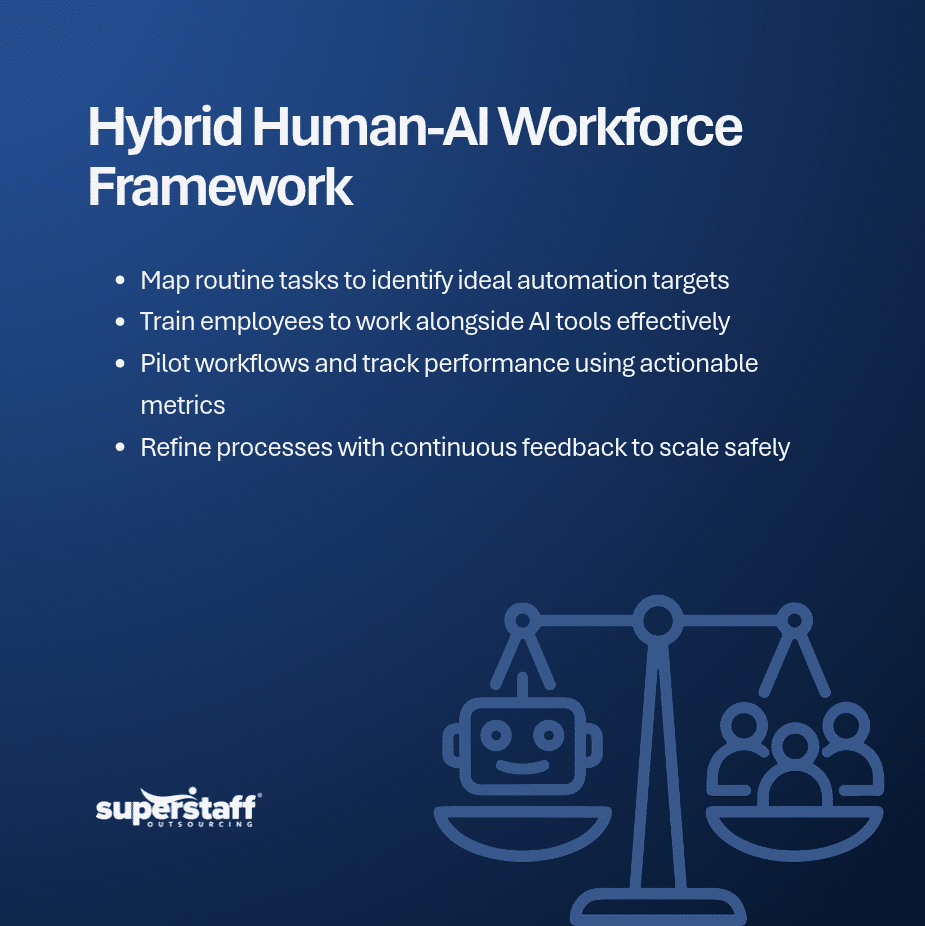
Introducing AI across the entire company at once can be difficult to manage. A pilot program gives businesses a chance to test a tool within one team or department before expanding its use.
Choose a task with clear requirements and measurable results. Monitor how the tool performs, gather employee feedback, and make adjustments before introducing it to other departments.
Help Employees Adjust to New Ways of Working
Technology alone cannot create a successful hybrid workforce. Employees need to understand how AI fits into their responsibilities and when they should rely on their own judgment.
Research on the future of work, including Microsoft’s New Future of Work Report 2025, discusses the importance of knowledge, transparency, and effective human oversight when people work with AI systems.
Businesses can support this transition through practical steps.
1. Provide Hands-On Training
Employees should learn how to use the tools they will encounter in their daily work. Training should cover practical activities, such as reviewing AI-generated information, correcting errors, and escalating unusual cases.
Give employees time to practice before making the new system part of their regular responsibilities. Short training sessions and clear instructions can make the learning process easier.
2. Explain Changes Clearly
Employees may feel uncertain when a company introduces AI. Some may wonder whether their responsibilities will change or whether technology will eventually replace their roles.
Managers should explain what the tools will do, which tasks will remain with employees, and how the changes support business goals. Regular updates also give workers an opportunity to raise questions.
3. Keep Human Skills at the Center
AI can process information quickly, but employees bring experience, empathy, communication skills, and an understanding of business situations.
A hybrid human-AI workforce should make good use of both. Technology can prepare information or handle routine requests, while employees manage complicated decisions, customer relationships, and situations that require personal judgment.
4. Address Employee Concerns
Do not assume that every employee will feel comfortable using AI immediately. Some may need more training, while others may have concerns about accuracy, privacy, or changes to their workload.
Give employees a way to share these concerns. Managers should respond with clear information and make adjustments when the feedback points to real problems.
5. Encourage Continuous Learning
AI tools and workplace processes will continue to change. Employees need opportunities to improve their digital skills and learn how new systems affect their responsibilities.
Companies can provide refresher training, team workshops, and coaching sessions. Ongoing learning helps employees remain confident and prepared as the business adopts additional tools.
Maintain Productivity During Implementation
Introducing AI should not prevent employees from completing their regular work. Businesses need a rollout plan that keeps essential processes running while teams learn to use new systems.
1. Introduce Changes in Phases
Avoid changing several major processes at the same time. Start with one workflow, evaluate the results, and expand only when the new process is working properly.
A phased rollout gives employees time to adjust and allows managers to address problems before they affect other departments.
2. Monitor the Right Performance Metrics
Track results before and after introducing AI. Useful measures may include task completion time, error rates, customer satisfaction, processing volume, and employee workload.
These figures help managers determine whether the new system is improving operations. They can also reveal areas where additional training or workflow changes are needed.
3. Keep Human Review in the Process
AI-generated results are not always correct. Systems may misunderstand instructions, overlook details, or produce information that does not fit a specific situation.
Employees should review outputs when accuracy matters, especially when decisions affect customers, finances, compliance, or business operations. Companies should also define which tasks require approval before an action is completed.
4. Collect Feedback Regularly
Performance data can show what is happening, but employee feedback can explain why certain problems occur.
Ask teams whether the new tools are saving time, creating extra steps, or making certain tasks harder. Customer feedback can also show whether the changes are improving service quality.
Use this information to make practical adjustments instead of keeping a process that does not work.
5. Encourage Team Collaboration
Employees and AI systems should support the same business goals. Make sure workers understand how information moves between automated tools and human teams.
Clear responsibilities, shared procedures, and regular communication help prevent confusion. They also make it easier for employees to work with AI without losing coordination with other departments.
The Benefits of a Balanced Human-AI Workforce
When companies introduce AI carefully, they can improve several parts of their operations without removing the value of human employees.
Some possible benefits include:
- Faster routine processes: AI can help complete repetitive tasks in less time.
- Better use of employee time: Workers can focus on responsibilities that need judgment and personal attention.
- More consistent workflows: Automated steps can follow approved rules and instructions.
- Improved customer support: AI can assist with basic inquiries while employees handle complex concerns.
- Greater workforce flexibility: Teams can adjust how they distribute tasks as business needs change.
- Better access to information: AI tools can help organize records and provide useful information for review.
These benefits depend on choosing the right tools and checking their performance. Businesses should not assume that adding AI will automatically improve every process.
Why Human Oversight Matters in AI Workflows
Even when an AI system performs well, some situations still need a person to review the result. A customer may have an unusual request, a document may contain missing information, or a recommendation may not fit the company’s policies.
This is where a human-in-the-loop approach becomes useful. Employees review selected AI outputs, correct errors, handle exceptions, and make decisions that require context.
SuperStaff explains this approach in its article on human-in-the-loop as a workforce model for AI outsourcing. It shows how trained professionals can support AI workflows through quality checks, validation, and exception handling.
Companies should define clear review rules so employees know when to step in. Not every output needs manual approval, but high-risk or unusual cases should have a clear path to human review.
How Outsourcing Can Support a Hybrid Workforce
Building a hybrid workforce does not mean every employee and skill must come from within the company. Outsourcing can provide additional professionals who support specific tasks while internal teams focus on core responsibilities.
For example, external teams can help manage customer inquiries, data processing, administrative work, and quality checks. These employees can work alongside existing staff and follow the company’s approved procedures.
This can be helpful when a business needs additional support but does not want to manage every recruitment and staffing requirement internally. Companies can also use outsourcing to access professionals with experience in particular business functions.
When considering this approach, businesses should review their workflows, data security requirements, training needs, and communication processes. Clear expectations help external teams work effectively with internal employees and AI tools.
Back-Office Support for Changing Business Needs
A hybrid workforce may also need help with routine administrative work. Tasks such as data entry, document processing, record updates, and order management can take up a large part of an internal team’s schedule.
Businesses can assign selected processes to trained external teams while keeping important decisions and approvals within the company. This arrangement can help employees focus on work that needs direct involvement and business knowledge.
SuperStaff’s Back-Office Support services can help companies manage recurring administrative workloads and support their wider operations.
Create Progress Without Disrupting Daily Operations
Building a hybrid human-AI workforce takes planning, employee involvement, and regular evaluation. Companies should start with tasks that are suitable for automation, train employees before making major changes, and maintain human oversight where decisions require judgment.
The best approach is not to introduce as much technology as possible. It is to use AI where it can solve real problems while keeping employees involved in the work that needs experience, communication, and accountability.
SuperStaff helps businesses build flexible teams that support customer service, back-office operations, data-related tasks, and other business functions. If your business is planning to combine AI tools with skilled professionals, contact SuperStaff to discuss a workforce solution that fits your operations.